 CanopyChart
Quote from the truck. Run the day from the board.
CanopyChart for firms you run yourself with a crew or two.
You climb, you estimate, you schedule and you send the bills. CanopyChart takes the desk work off the evenings: the quote, the day, the invoices and the chasing.
One flat price for the firm. No contract. Start with a trial.
Early access opens spring 2027. Any firm size can sign up.
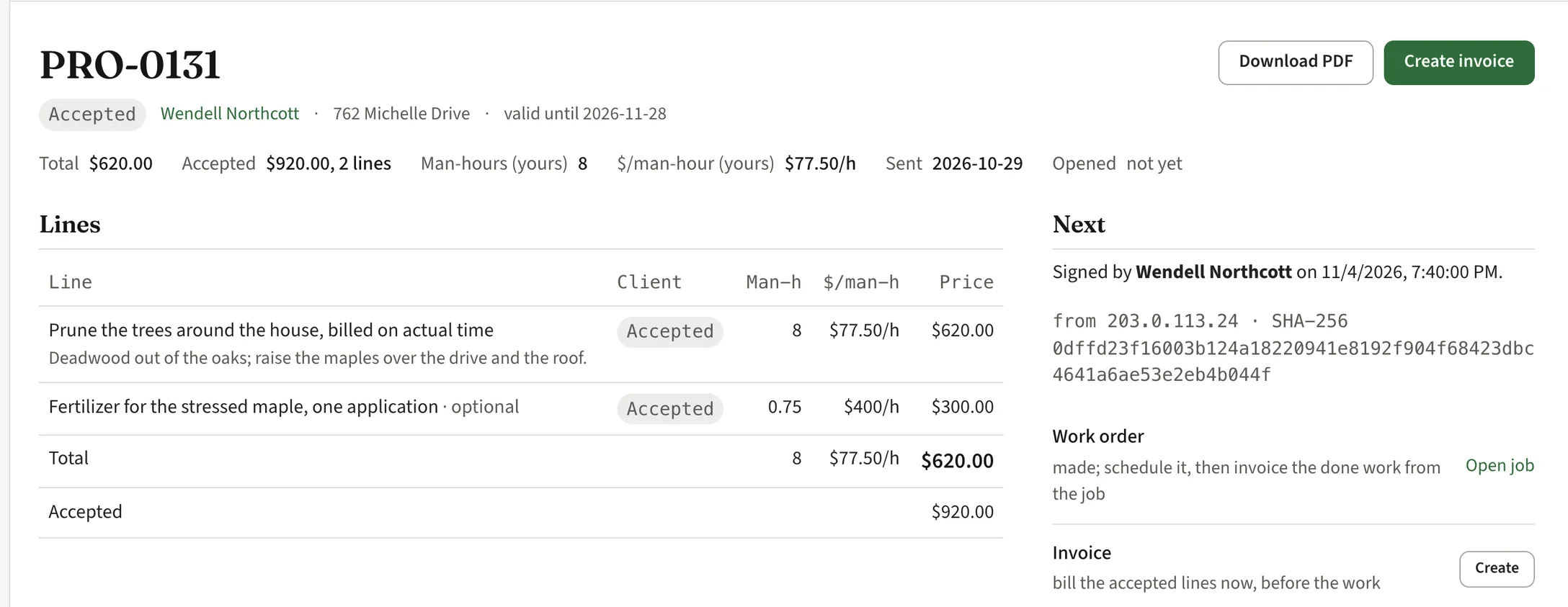
One line, a paragraph, a price.
Write the quote the way you talk to the customer at the gate. The app keeps your hours and your rate behind it, where only you see them.
- Billed on actual time
- Prune the trees around the house, deadwood out of the oaks, raise the maples over the drive: one line, your estimate of the hours, one price.
- Optional lines
- The stump, the fertilizer, the cable: optional lines the customer takes or leaves on their phone. You find out which before the truck rolls.
- Your rate per man-hour
- Every proposal shows the rate per man-hour it implies. A $620 job at eight man-hours is $77.50 an hour; you decide if that is a day worth doing.
- Sent and signed from a phone
- The proposal goes out with your name and your terms on it. The customer reads it, asks a question and signs it from their phone. The record is kept.
The day doesn't run past dark.
The board shows your crew's stops in order with the drive between them. When the last stop lands after five, the board says so in the morning, not at four.
- Drive time on the board
- The minutes from one job to the next, between the cards. Three stops across the county is a different day from three on one road.
- Won't fit
- A stop the day cannot hold is flagged. Push it to tomorrow, or to the open list until there is a day for it.
- Storm calls
- A limb on a roof at six in the morning goes in as a quick job: address, caller, what came down. It is on the board in half a minute and the day moves around it.
- Rounds that come back
- Lanternfly in three rounds, deep-root feeding spring and fall, monthly tree care: say it once as a plan and the visits are on the schedule for the season.

Your groundie sees the day on their phone.
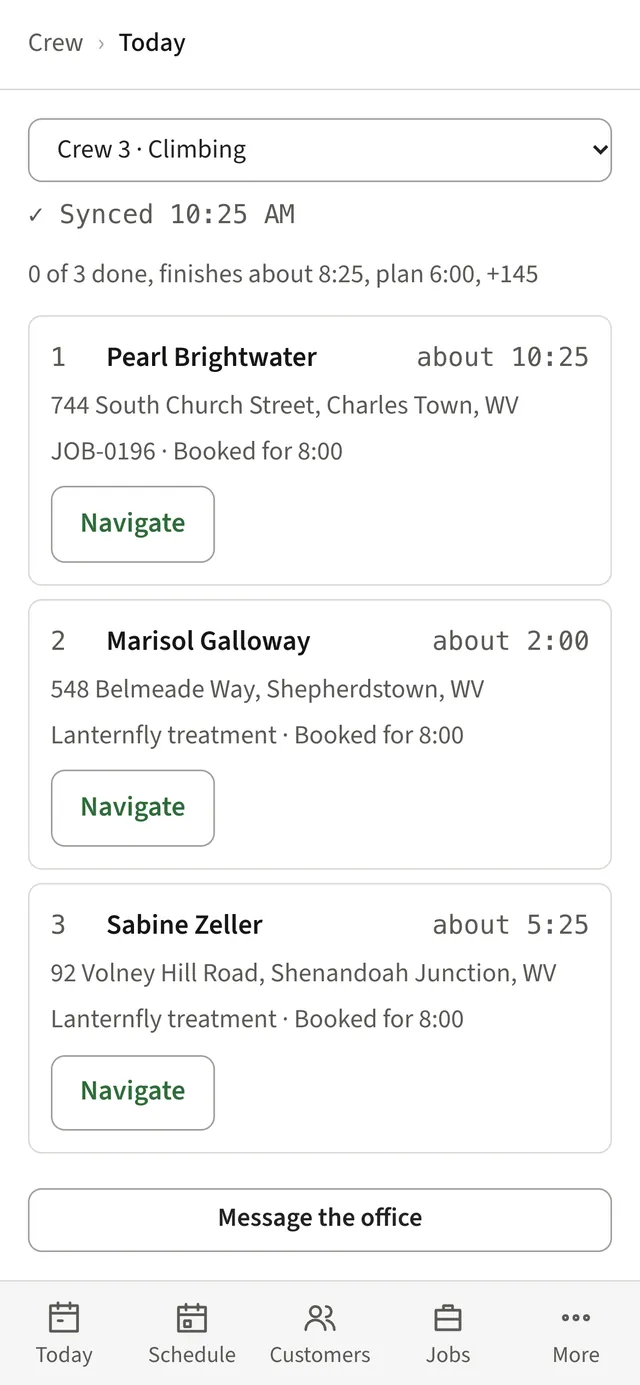
Today's stops in order with Navigate on each, one tap in and one tap out at the site, and a line to the office that is not your personal number.
- Today's stops
- The customer, the address, the job and when it was booked for. Tap Navigate and go.
- Check in, check out
- Time on site, stop by stop, so the next quote for the same kind of job is closer to right.
- Hours from the taps In development
- Departed, arrived, done: the taps add up to hours for payroll. Not in the app yet.
Get paid without chasing.
Invoice the accepted lines before the work or the done work after it. Each invoice has a pay link, and the reminders go out without you writing them.
- Invoice from the proposal
- The accepted lines become the invoice in one click, or the job's actual hours do when the work is done.
- Pay from a link
- Part of early access: customers pay online by card or bank from the link in the text or the email. A $2,500 removal by bank transfer costs you a few dollars in fees, not a few percent.
- Who owes you
- One list of what is open and what is overdue, so you know before you call.
A customer page with your name on it.
Every customer gets a page with your logo, your colours and your phone number, opened from the link you send. Their proposals, invoices and trees are on it, so they stop calling to ask.
- Proposals and invoices in one place
- Open invoices with a pay button, proposals to sign, and the work done or coming up on each property.
- No app to install
- It opens from the link. Part of early access: customers sign in with their email or phone number and a code, no password.
- A website too, if you want one
- A hosted site at yourfirm.canopychart.com with your services, your credentials, an emergency band with your number, and a request form that lands in your customer list.
One flat price. No contract. Start with a trial.
Everything a small firm needs to run the day and get paid. Nothing you would hire an office manager to run.
- Month to month
- Leave when you want and take your data with you.
- One price for the firm
- No per-seat charges, so the groundie's phone costs nothing extra. You see the price before you commit. Pricing is not final; early-access firms hear it first.
- Your customers, imported
- Part of early access: we load your customers from a spreadsheet or your old app, free, in the first week.
Get early access.
CanopyChart opens to a small number of firms first, in spring 2027. Tell us who you are and how big the crew is, and we will write when your spot comes up.
Joining the list commits you to nothing. Early access starts with a trial, then month to month with no contract.