 CanopyChart
Climbing crew, bucket truck, one board.
Tree care software for scheduling, quoting and billing, on one map.
Each crew's day in order, with the drive between stops. A job that will not fit today says so before the truck rolls. A storm call becomes a job in a minute, not a note on the dash.
Month to month. No contract. Crew seats free. Take your data when you leave.
Early access opens spring 2027 for tree care firms with an owner and a few crews.

Crews by what they carry.
A climbing crew, a bucket truck, the stump grinder, the plant health care rig. Each is a column on the day's board with its stops in order and the drive time between them. Nothing is locked: move, skip or redo any stop by hand.
- Crews, not just names
- Name a crew for what it is: Climbing, Bucket truck, Stumps and clearing. Put the job on the crew that can do it.
- Drive time between stops
- The board shows the minutes from one job to the next. A job that lands after quitting time says so before the day starts.
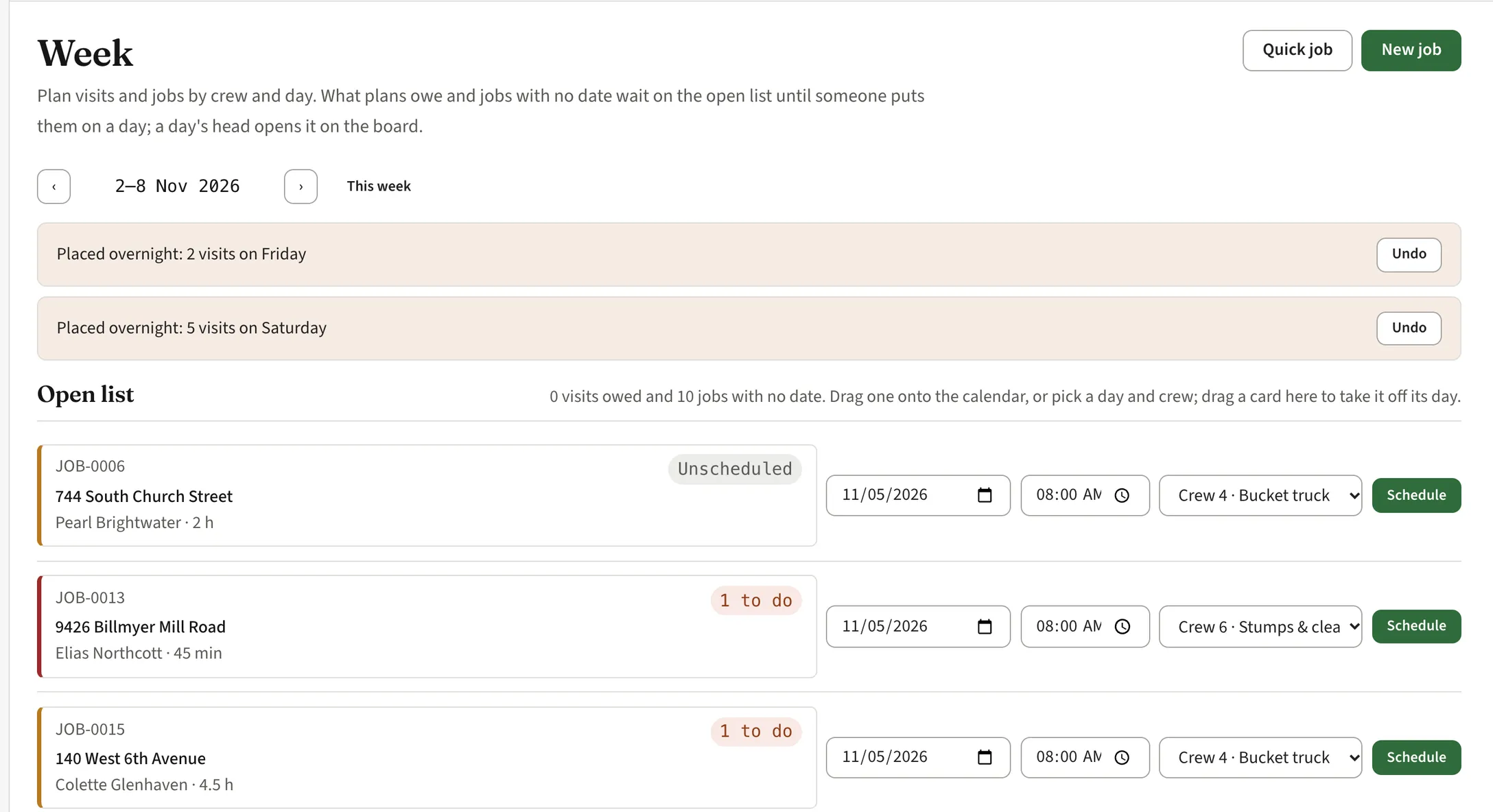
- Won't fit
- A stop the day cannot hold is flagged on its crew's column. Push it, swap it, or send it to the open list for the week.
- The open list
- Jobs with no date wait on the week's open list with their hours. Drag one onto a day and a crew, or pick them from the row.
Which firm are you?
Same app either way. These two pages talk about the days you actually have.
Storm calls become jobs.
The phone rings at six with a limb on a roof. Write it down once as a quick job with the address and the caller, put it on the first crew that is free, and the day moves around it.
- Quick job
- Address, caller, what came down, which crew. Half a minute, and it is on the board with the drive time to it.
- Your emergency line on your site
- The hosted website carries an emergency band on every page with the number to call, day and night, and a call bar on phones.
- Triage flags In development
- Tree on house, blocked driveway, blocked road, tree down in a field: flags that sort the calls and offer a partial clearing first. Not in the app yet.
- A text before you arrive In development
- A text to the owner when the crew is on the way, with the truck's colour so they know who is pulling in. Not in the app yet.
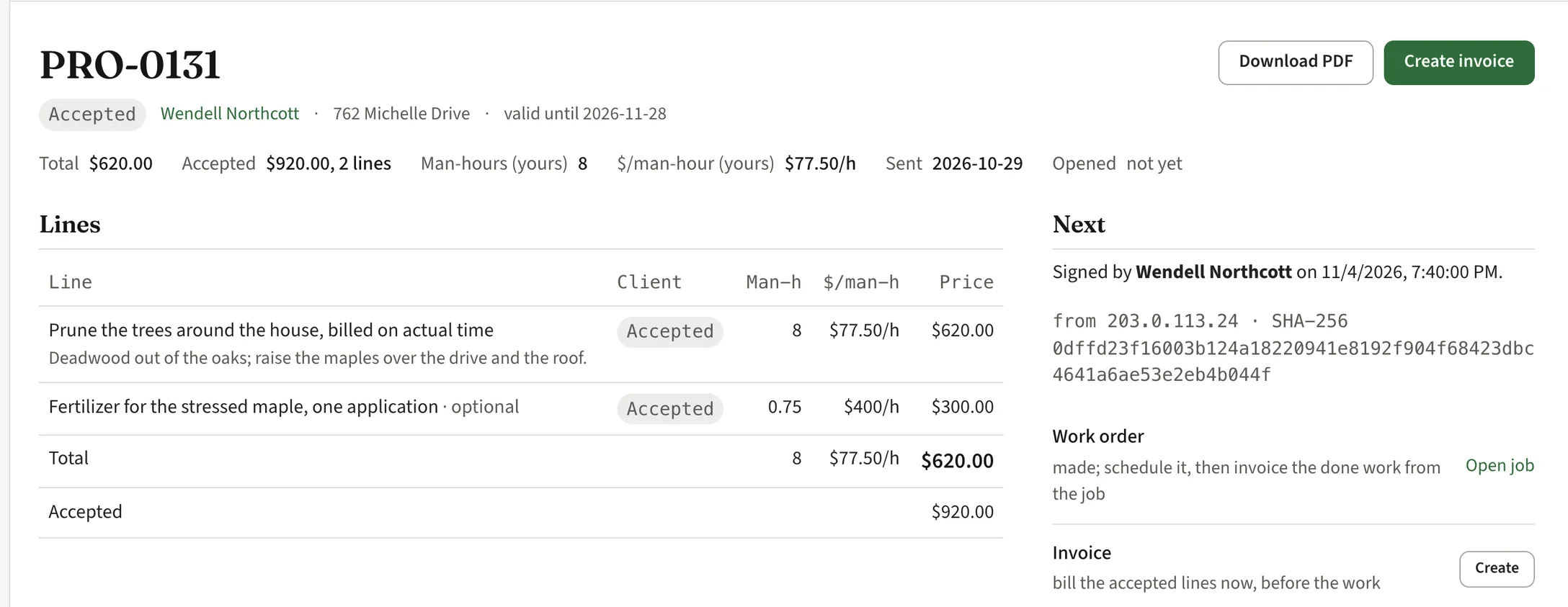
Quote by the crew-hour. Know your rate.
Tree firms sell time, risk and equipment, not square feet. Write the quote the way you talk: one line, a paragraph, a price. The app works out your rate per man-hour and keeps it to yourself.
- One line, a paragraph
- Prune the trees around the house, billed on actual time. The customer sees one price; you see the hours behind it.
- Optional lines
- A fertilizer application for the stressed maple as an optional line. The customer accepts or declines it on their phone.
- Your rate per man-hour
- Every quote shows the rate per man-hour it implies, so a lump sum never hides a bad day. The customer never sees it.
- Signed online
- The customer reads it, asks about it and signs it from a phone. The time and the record are kept with the proposal.
The trees, on the map. From lidar next.
Every place a customer owns is on your map with its parcel line from the county's records. Trees you add go on it with species, size, condition and the work done. What comes next is in development, and marked that way.
- Today: the place on its parcel
- Type the address and the parcel is there for most US counties. Each customer's places, the work on them and the money owed, on one map.
- Trees from lidar In development
- Open an address and the trees are already there from free public lidar: crown, height, spread and the distance to the house. You confirm and correct instead of mapping from scratch.
- A map that leads with the trees In development
- Parcels and buildings fade to outlines; the crowns carry the colour, by species, condition or what is due. A legend with counts.
- Price by the tree In development
- Hours per tree from its size and how it comes down, your crew rate, your margin for surprises. An estimate before the visit; the visit confirms it.
- Screening apart from your assessment In development
- Any automated screening will be labelled decision support and kept separate from the rating an arborist signs. It never changes your assessment.
The crew's phone knows the day.
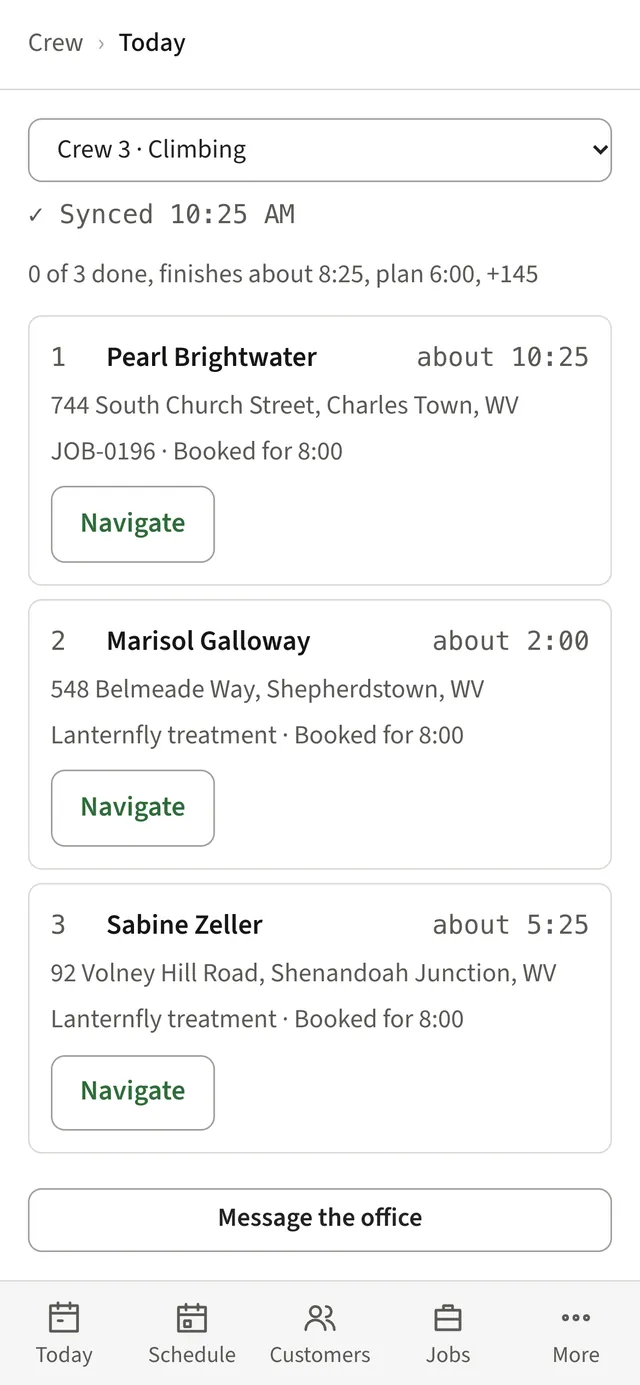
Each crew opens their phone and sees their stops in order, about when they are expected at each, and a Navigate button. Nothing to scroll past.
- Today's stops
- Crew 3, Climbing: three stops, the address, the job, when they were booked for. Tap Navigate and go.
- Check in, check out
- One tap at the site on arrival, one on leaving. Time on site goes back into the next quote.
- Message the office
- A question from the site goes to the office in the app, not to somebody's personal phone.
- Hours from the taps In development
- Departed, arrived, done: the taps add up to hours for payroll, and to how much of the day was driving, waiting or weather. Not in the app yet.
Plant health care, round after round.
Treatment rounds are plans. Three lanternfly rounds, deep-root feeding in spring and fall, monthly tree care: say it once and the visits appear on the schedule for the season.
- Plans make visits
- A plan on a place makes its own visits for the season. Change the plan and the visits change with it.
- Programs that renew
- Monthly care billed by the month, with fertilizer and extra pruning as add-on lines the customer accepts on the proposal.
- Application records In development
- The record each state asks an applicator to keep, written from the visit. Not in the app yet, and it will never tell you what to apply.
Bill from the work. Get paid online.
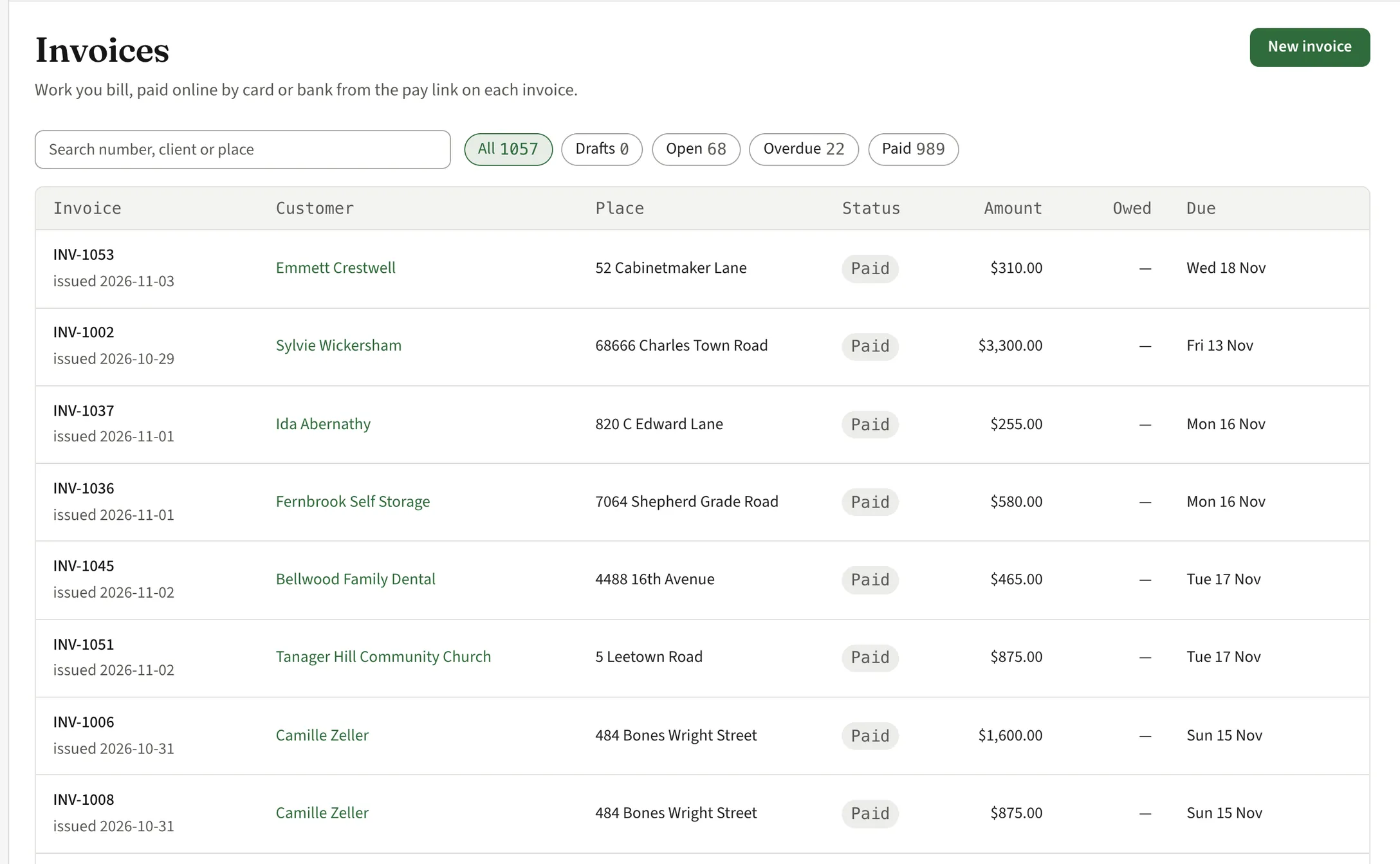
Every customer and every place is one record: the plans, the trees, the jobs, the notes and the money. Invoices come off the accepted lines or the work that was done, not off memory.
- One record
- A customer with two properties is one customer and two places, each with its own trees, plans and history.
- Invoice from the proposal or the job
- Bill the accepted lines before the work, or the done work from the job afterwards. Each invoice says what it is for.
- Get paid
- Part of early access: see who owes you and what is overdue, send a reminder, and let customers pay online by card or bank from a link in the text or the email.
- QuickBooks Online sync
- Part of early access: customers, invoices and payments go to QuickBooks Online, so your bookkeeper keeps working the way they do now.
A customer page with your name on it.
One page per customer, with your logo, your colours and your phone number. They open it from the link you send, no app to install. It works whether or not you keep your own website.
- Sign in with email or phone
- Part of early access: customers sign in with their email address or phone number and get a code. No password to forget.
- Pay the bill
- Open invoices with a pay button, by card or bank, and the ones already paid.
- Sign the proposal
- Proposals to read, ask about and sign from a phone. Your price, your terms, your name at the top.
- Their trees and jobs
- Each property and the work done or coming up on it, so the customer stops calling to ask.
- A report they keep In development
- A link from your report opens a read-only view of their property with your name on it: the trees, what you found, what you recommend. It stays theirs if they move or change arborists. Not in the app yet.
A website for the firm, included.
Firms get a hosted site at yourfirm.canopychart.com: the name, the services, the area, your credentials, an emergency band, and a request form that lands in your customer list.
- Up in an afternoon
- Fill in the services and the area, add photos of your work, and it is live. No designer, no hosting bill.
- The emergency number on top
- Your storm line at the top of every page, with a call bar on phones. The call comes to you, not to a form.
- Requests become customers
- A homeowner sends the form with their address. The parcel is already on your map when you open the request.
- Your name on it
- Your colours and logo. Point your own domain at it when you have one.
Month to month. One flat price for the firm.
Everything a tree care firm needs to run the week and get paid. Crew seats are free, so a storm crew for a week costs nothing extra.
- No contract
- Pay by the month. Leave when you want and take your data with you.
- One flat monthly price
- One price for the firm, no per-seat charges. You see the price before you commit. Pricing is not final; early-access firms hear it first.
- Your customers, imported
- Early-access firms get their customers imported free in the first week, from a spreadsheet or the old app.
Questions
When can I use it?
Early access opens in spring 2027, a few firms at a time, so each one is set up properly before the season. Leave your details below and we will write when it is your turn.
Who is it for?
Tree care firms with an owner and a few crews. A climber and a groundie, or six crews and a crane day, it fits. Fifty crews, talk to us first.
Are the trees from lidar ready?
No. Trees from lidar, the map that leads with the trees, pricing by the tree and the owner's report link are in development, and this page marks each of them that way. What is not marked is in the app today.
Is this a risk assessment tool?
No. A risk assessment is the arborist's, signed by the arborist. Any automated screening we add will be labelled as decision support, kept separate from your assessment, and unable to change it.
Where does the parcel data come from?
From each county's own published parcel records, which cover most US counties. The lines are the county's, not ours. Where a county publishes nothing, we say so instead of guessing.
Does it work with QuickBooks?
QuickBooks Online sync is part of early access. Customers, invoices and payments sync, so the books stay where they are.
Do the crews need to install an app?
Crews get the day's stops and check in from their phone's browser. The owner runs the firm from the full app on a laptop, a tablet or a phone.
Is there a contract?
No. Month to month, cancel any time. Pricing is not final; it will be one flat monthly price for the firm with no per-seat charges, and you see it before you commit.
Get early access.
CanopyChart opens to a small number of firms first, in spring 2027. Tell us who you are and how big the crew is, and we will write when your spot comes up.
Joining the list commits you to nothing. Early access starts with a trial, then month to month with no contract.